Building a workflow from individual modules
The getting started vignette uses
build_hypergraph() as a single entry point. Here we
separate the steps so that you can choose the preprocessing, inspect
candidate multiplets, calculate information estimates, change the
testing procedure, or supply your own node-clustering method.
The main sequence is:
item responses → preprocessing → candidate groups → O-information estimates → statistical screening.
These modules return different kinds of objects. Preprocessing
returns data and a correlation matrix; candidate generation returns
variable sets; information estimation returns numerical quantities; and
the testing pipeline returns a table. build_hypergraph()
additionally assembles the fitted hypergraph object used by the
package’s plotting and structural-analysis functions.
We use six BFI items to keep the combinations easy to inspect. All analysis steps below run when the vignette is built, including the single-candidate tests, the 35-candidate testing pipeline, and the user-defined hypergraph fit. Subsequent plots and clustering use the objects created by these calls.
1. Select the data
library(psychHypergraph)
library(psych)

data(bfi)
data_bfi <- bfi[, c("A1", "A2", "A3", "C1", "C2", "C3")]

head(data_bfi)
#>       A1 A2 A3 C1 C2 C3
#> 61617  2  4  3  2  3  3
#> 61618  2  4  5  5  4  4
#> 61620  5  4  5  4  5  4
#> 61621  4  4  6  4  4  3
#> 61622  2  3  3  4  4  5
#> 61623  6  6  5  6  6  6
colSums(is.na(data_bfi))
#> A1 A2 A3 C1 C2 C3
#> 16 27 26 21 24 20A1-A3 belong to the agreeableness domain,
and C1-C3 belong to the conscientiousness
domain. As in the introductory example, we use item responses, not
domain scores. All numerical candidate indices in this vignette refer to
these six selected columns, rather than the original
25-item ordering.
2. Choose the preprocessing explicitly
To illustrate an alternative to the default, we use Pearson correlations without rank normalization and omit participants with missing responses on any selected item.
cor_method <- "pearson"

prep <- data_preprocess_pipeline(
  data = data_bfi,
  cor_method = cor_method,
  handle_na = "omit",
  transform = "none"
)

analysis_data <- prep$normalized_data
cor_bfi <- prep$cor_matrix

prep$n_obs
#> [1] 2686
prep$transform
#> [1] "none"
round(cor_bfi, 2)
#>       A1    A2    A3   C1   C2    C3
#> A1  1.00 -0.34 -0.26 0.02 0.02 -0.02
#> A2 -0.34  1.00  0.49 0.09 0.13  0.19
#> A3 -0.26  0.49  1.00 0.10 0.14  0.13
#> C1  0.02  0.09  0.10 1.00 0.43  0.31
#> C2  0.02  0.13  0.14 0.43 1.00  0.36
#> C3 -0.02  0.19  0.13 0.31 0.36  1.00
Complete-case selection leaves 2,686 participants.
The field normalized_data retains that name even when
transform = "none"; here it contains the observed item
values after removing incomplete rows. In particular, the negative
correlations involving reverse-keyed A1 have not been
replaced by their absolute values.
This is a numerical Pearson/Gaussian information-estimation example for ordinal item scores, not a claim that the original responses are continuous Gaussian measurements. The following alternatives change the estimation assumptions:
| Correlation choice | Transformation | Interpretation |
|---|---|---|
"pearson" |
"none" |
Gaussian correlation-based estimates on the observed numerical values. |
"pearson" |
"rank" or "auto"
|
Rank-normalized values followed by Pearson correlation. |
"polychoric" |
"none" or "auto"
|
Correlations between modeled latent continuous responses underlying the categories. |
The polychoric route does not support
transform = "rank". Rank normalization changes the marginal
values but does not establish multivariate normality. A polychoric
analysis is also not a direct discrete-entropy estimate. Choose the
route according to the data and scientific question, and use the same
processed data and correlation model for estimation and resampling.
3. Generate candidate groups
Enumerate combinations
triplets <- generate_all_multiplets(n_vars = ncol(analysis_data), k = 3)
quadruplets <- generate_all_multiplets(n_vars = ncol(analysis_data), k = 4)
candidates <- c(triplets, quadruplets)

length(candidates)
#> [1] 35
candidates[1:3]
#> [[1]]
#> [1] 1 2 3
#>
#> [[2]]
#> [1] 1 2 4
#>
#> [[3]]
#> [1] 1 2 5
There are 20 triplets and 15 quadruplets, giving 35
candidates. Each list element is a vector of column indices.
For example, c(1, 2, 3) denotes A1,
A2, and A3.
Enumeration is convenient at this scale. The number of candidates grows combinatorially: searching all three- to five-item combinations of 25 variables would require 68,080 combinations before resampling.
Compare clique-based generation
clique_result <- generate_candidate_multiplets(
  data = analysis_data,
  k = 3,
  cor_matrix = cor_bfi,
  n_obs = prep$n_obs,
  ebic.gamma = 0.5
)
#> Warning in EBICglassoCore(S = S, n = n, gamma = gamma, penalize.diagonal =
#> penalize.diagonal, : A dense regularized network was selected (lambda < 0.1 *
#> lambda.max). Recent work indicates a possible drop in specificity. Interpret
#> the presence of the smallest edges with care. Setting threshold = TRUE will
#> enforce higher specificity, at the cost of sensitivity.

length(triplets)
#> [1] 20
length(clique_result$candidates)
#> [1] 12
For this example, clique search returns 12 triplets,
compared with the 20 triplets from exhaustive enumeration. We explicitly
pass cor_bfi and the effective sample size so that the
candidate network uses the intended correlation model. With this small
network, qgraph issues a warning that a dense regularized
network was selected and that the smallest edges require careful
interpretation. Inspect that network before relying on its candidate
search in substantive work; the warning is not a reason to silently
change the analysis.
The remaining sections keep the original 35 exhaustive
candidates. To use only the clique triplets, replace
candidates with clique_result$candidates. This
changes the search space and the multiplicity family, and it removes the
four-item candidates from this example. A clique search may also return
no candidates; it does not automatically become an exhaustive
search.
4. Calculate O-information
Start with one candidate
vars <- candidates[[1]]
info <- compute_Oinfo(cor_bfi[vars, vars])
info
#> $Omega
#> [1] 0.02905711
#>
#> $TC
#> [1] 0.204997
#>
#> $DTC
#> [1] 0.1759398
#>
#> $type
#> [1] "redundant"
compute_Oinfo() accepts a candidate’s correlation
submatrix. It returns total correlation (TC), dual total
correlation (DTC), their difference
Omega = TC - DTC, and a sign-based type label. For
A1, A2, and A3, the estimate is
approximately 0.0291 nats, indicating
redundancy-dominated dependence under the chosen model. A sign-based
label alone is not evidence that the candidate has passed statistical
screening. A value near zero does not establish independence.
Calculate all candidate estimates
oinfo_table <- data.frame(
  candidate_id = seq_along(candidates),
  items = NA_character_,
  k = lengths(candidates),
  Oinfo = NA_real_
)

for (i in seq_along(candidates)) {
  vars <- candidates[[i]]
  oinfo_table$items[i] <- paste(names(analysis_data)[vars], collapse = ", ")
  oinfo_table$Oinfo[i] <- compute_Oinfo(cor_bfi[vars, vars])$Omega
}

head(oinfo_table)
#>   candidate_id      items k         Oinfo
#> 1            1 A1, A2, A3 3  0.0290571072
#> 2            2 A1, A2, C1 3 -0.0014971204
#> 3            3 A1, A2, C2 3 -0.0021971429
#> 4            4 A1, A2, C3 3 -0.0009643376
#> 5            5 A1, A3, C1 3 -0.0010785560
#> 6            6 A1, A3, C2 3 -0.0014843928
ranked <- oinfo_table[order(abs(oinfo_table$Oinfo), decreasing = TRUE), ]
head(ranked, 8)
#>    candidate_id          items k      Oinfo
#> 34           34 A2, C1, C2, C3 4 0.04097106
#> 35           35 A3, C1, C2, C3 4 0.03989397
#> 23           23 A1, A2, A3, C3 4 0.03472819
#> 20           20     C1, C2, C3 3 0.03322586
#> 30           30 A1, C1, C2, C3 4 0.03311802
#> 22           22 A1, A2, A3, C2 4 0.03270165
#> 21           21 A1, A2, A3, C1 4 0.03060052
#> 1             1     A1, A2, A3 3 0.02905711
The largest point estimate is about 0.0410 nats for
A2, C1, C2, C3. Some cross-domain triplets have small
negative estimates. Ranking by absolute information provides a
descriptive overview.
If you want to inspect the estimates outside R, export the table:
write.csv(oinfo_table, "bfi_oinfo.csv", row.names = FALSE)5. Examine one candidate’s uncertainty
The resampling functions require the processed observations, not just a correlation matrix. They re-estimate correlations in the resampled data.
vars <- candidates[[1]]

set.seed(123)
perm_result <- permutation_Oinfo(
  data = analysis_data,
  vars = vars,
  n_perm = 1000,
  cor_method = cor_method
)

perm_result
#> $obs_O
#> [1] 0.02905711
#>
#> $pval
#> [1] 0.000999001
The point estimate is unchanged and the unadjusted permutation
p-value is approximately 0.000999. With 1,000 permutations, this is the
smallest attainable value using
(number of equally or more extreme permutations + 1) / 1001;
it is not zero. Each column is shuffled independently, so the null
destroys dependence between variables rather than preserving pairwise
associations.
set.seed(123)
boot_result <- bootstrap_Oinfo(
  data = analysis_data,
  vars = vars,
  n_boot = 1000,
  cor_method = cor_method,
  alpha_boot = 0.05
)

boot_result
#> $ci_lower
#> [1] 0.02232582
#>
#> $ci_upper
#> [1] 0.03720583
#>
#> $robust
#> [1] TRUE
The 95% BCa interval is approximately [0.0223,
0.0372] and excludes zero, so robust is
TRUE. This concerns the interval for one candidate. It does
not complete adjustment across a family of candidates, nor does it
demonstrate a causal interaction.
6. Apply the full testing pipeline
To screen a whole family, pass the processed data and candidate list
to sig_multiplet_testing_pipeline(). Here we replace the
default FDR correction with Holm correction:
set.seed(123)
test_results <- sig_multiplet_testing_pipeline(
  data = analysis_data,
  multiplets = candidates,
  cor_method = cor_method,
  n_perm = 1000,
  n_boot = 1000,
  correct_method = "holm",
  Oinfo_threshold = 0.01,
  parallel = TRUE,
  n_cores = 12
)

head(test_results)
#>   hyperedge_id  vars k         Oinfo      perm_p perm_p_adj boot_ci_lower
#> 1            1 1,2,3 3  0.0290571072 0.000999001 0.03496503    0.02134389
#> 2            2 1,2,4 3 -0.0014971204 0.000999001 0.03496503            NA
#> 3            3 1,2,5 3 -0.0021971429 0.000999001 0.03496503            NA
#> 4            4 1,2,6 3 -0.0009643376 0.000999001 0.03496503            NA
#> 5            5 1,3,4 3 -0.0010785560 0.000999001 0.03496503            NA
#> 6            6 1,3,5 3 -0.0014843928 0.000999001 0.03496503            NA
#>   boot_ci_upper boot_robust hierarchical_valid significant
#> 1    0.03636323        TRUE               TRUE        TRUE
#> 2            NA       FALSE              FALSE       FALSE
#> 3            NA       FALSE              FALSE       FALSE
#> 4            NA       FALSE              FALSE       FALSE
#> 5            NA       FALSE              FALSE       FALSE
#> 6            NA       FALSE              FALSE       FALSE
test_results[test_results$significant, ]
#>    hyperedge_id  vars k      Oinfo      perm_p perm_p_adj boot_ci_lower
#> 1             1 1,2,3 3 0.02905711 0.000999001 0.03496503    0.02134389
#> 20           20 4,5,6 3 0.03322586 0.000999001 0.03496503    0.02633062
#>    boot_ci_upper boot_robust hierarchical_valid significant
#> 1     0.03636323        TRUE               TRUE        TRUE
#> 20    0.04181404        TRUE               TRUE        TRUE
The output above shows the retained rows together with their
estimates, adjusted p-values, and BCa intervals. This run retains
2 of the 35 candidates. The retained triplets are
A1, A2, A3 and C1, C2, C3, both
redundancy-dominated. Serial execution is used here; for parallel
computation, set parallel = TRUE and specify an appropriate
n_cores.
The standalone and pipeline BCa endpoints for the first triplet differ slightly because the calls use different random streams within their respective procedures; the underlying point estimate is the same.
The result also shows why a small permutation p-value is not sufficient: several candidates have adjusted p-values below 0.05 but do not meet the 0.01-nat effect threshold, so they receive no bootstrap interval at that stage. Conversely, the four-item groups with large point estimates do not survive all screening steps. A large estimate alone does not establish an additional retained higher-order structure.
For a robust candidate above order three, the procedure compares its interval with all immediate, one-order-smaller subsets. Required subset intervals are computed even if the subsets were not original candidates or did not pass the initial screening. Inspect those comparison records with:
subset_intervals <- attr(test_results, "hierarchical_subset_results")
head(subset_intervals)
#>    vars boot_ci_lower boot_ci_upper
#> 1 1,2,4 -0.0033914334 -0.0003495850
#> 2 1,3,4 -0.0024854938 -0.0001235512
#> 3 2,3,4  0.0009210495  0.0057861099
#> 4 1,2,5 -0.0045244345 -0.0003942589
#> 5 1,3,5 -0.0032508633 -0.0001734890
#> 6 2,3,5  0.0032752777  0.0101905828
Some comparison subsets can therefore have intervals in this
attribute even though their own candidate-table interval is
NA. These records support the hierarchical comparison; they
are not automatically retained edges or extra members of the original
permutation-testing family. Any interval intersection, including
endpoint contact, counts as overlap. Missing or invalid comparison
intervals prevent validation. This is a screening rule, not a formal
test of the difference between dependent estimates.
7. Build an object from user-defined candidates
The modular testing result is a table, not a
psychHypergraph object. To use the package’s hypergraph
plotting methods, the supported entry point is
build_hypergraph(). You can give it exactly the candidates
you want:
This second workflow deliberately uses rank-normalized
Pearson data. The explicit transform = "rank"
makes the change from Section 2 visible; transform = "auto"
would have the same behavior for Pearson correlations.
hg_custom <- build_hypergraph(
  data = data_bfi,
  cor_method = "pearson",
  handle_na = "omit",
  transform = "rank",
  k = 3:4,
  candidate_method = "user",
  user_multiplets = my_candidates,
  n_perm = 1000,
  n_boot = 1000,
  correct_method = "holm",
  seed = 123,
  parallel = FALSE
)

hg_custom
#> psychHypergraph Object Summary
#> ==============================
#>
#> Subjects: 2686
#> Variables: 6
#> Candidate Multiplets Evaluated: 3
#> Total Active Hyperedges: 2
#>   - Redundant (O-info > 0): 2
#>   - Synergistic (O-info < 0): 0
#>
#> O-Info Statistics:
#>   Range: [0.033, 0.035]
#>   Mean (abs): 0.034
#>
#> Parameters:
#>   cor_method: pearson
#>   k: 3, 4
#>   Candidate selection method: user
#>
#> Use $hypergraph to access full hyperedge list
#> Use $hyperedge_details to view complete test results
#>
#> To plot:
#>   plot(x)                    # Full hypergraph
#>   plot(x, type='redundant')  # Only redundant
#>   plot(x, type='synergistic')# Only synergistic
#>   plot(x, top_n=10)          # Top 10 by |O-info|
hg_custom$all_test_results
#>   hyperedge_id    vars k       Oinfo      perm_p  perm_p_adj boot_ci_lower
#> 1            1   1,2,3 3 0.033299914 0.000999001 0.002997003    0.02488151
#> 2            2   4,5,6 3 0.034879499 0.000999001 0.002997003    0.02804660
#> 3            3 1,2,4,5 4 0.002560491 0.000999001 0.002997003            NA
#>   boot_ci_upper boot_robust hierarchical_valid significant
#> 1    0.04078265        TRUE               TRUE        TRUE
#> 2    0.04330793        TRUE               TRUE        TRUE
#> 3            NA       FALSE              FALSE       FALSE
The fit retains the two triplets. Their estimates are approximately 0.03330 and 0.03488 nats, rather than the earlier 0.02906 and 0.03323. The change in point estimates comes from the rank transformation, not from reducing the candidate family. Reducing the family from 35 to three also changes the multiplicity adjustment: the retained triplets now have Holm-adjusted p-values of approximately 0.002997.
| Feature | Modular example, Sections 2–6 | User-defined fit, this section |
|---|---|---|
| Missing values | Complete cases | Complete cases |
| Effective sample size | 2,686 | 2,686 |
| Correlation | Pearson | Pearson |
| Transformation | None | Rank normalization |
| Candidate family | 35 triplets and quadruplets | Three specified groups |
| Multiplicity adjustment | Holm | Holm |
This is a second analysis, not a conversion or reuse of the earlier
test table. The main function preprocesses the original data and runs
tests again. To retain the modular example’s preprocessing and search
family, instead set transform = "none" and
user_multiplets = candidates. Do not pass already
rank-transformed observations back into a workflow that applies the same
transformation again.
candidate_method = "user" means only these
candidates are tested. Supplying user_multiplets
alongside an automatic strategy instead adds them to that strategy’s
candidates. Neither option bypasses the statistical screening.
The example candidates are specified by item names for clarity. If you select candidates by ranking O-information in the same data, describe the exercise as exploratory. Subsequent adjustment within the selected family does not automatically account for that data-driven selection; independent validation or a suitably designed selection procedure is needed for stronger claims.
8. Select existing results without retesting
Once an object exists, you can select its retained edges using your own rule without recomputing tests. Here the rule is: retained, positive O-information, and order three.
edge_table <- hg_custom$all_test_results
selected_ids <- edge_table$hyperedge_id[
  edge_table$significant & edge_table$Oinfo > 0 & edge_table$k == 3
]

hg_selected <- subset_hypergraph(hg_custom, hyperedge_ids = selected_ids)
hg_selected
#> psychHypergraph Object Summary
#> ==============================
#>
#> Subjects: 2686
#> Variables: 6
#> Candidate Multiplets Evaluated: 2
#> Total Active Hyperedges: 2
#>   - Redundant (O-info > 0): 2
#>   - Synergistic (O-info < 0): 0
#>
#> O-Info Statistics:
#>   Range: [0.033, 0.035]
#>   Mean (abs): 0.034
#>
#> Parameters:
#>   cor_method: pearson
#>   k: 3, 4
#>   Candidate selection method: user
#>
#> Use $hypergraph to access full hyperedge list
#> Use $hyperedge_details to view complete test results
#>
#> To plot:
#>   plot(x)                    # Full hypergraph
#>   plot(x, type='redundant')  # Only redundant
#>   plot(x, type='synergistic')# Only synergistic
#>   plot(x, top_n=10)          # Top 10 by |O-info|
The selected object contains the same two triplets. IDs belong to their own analysis object: an ID from the 35-candidate table must not be used to identify an edge in the three-candidate fit. Match variable sets if you need to compare different analyses.
plot(hg_selected, vertex.size = 25)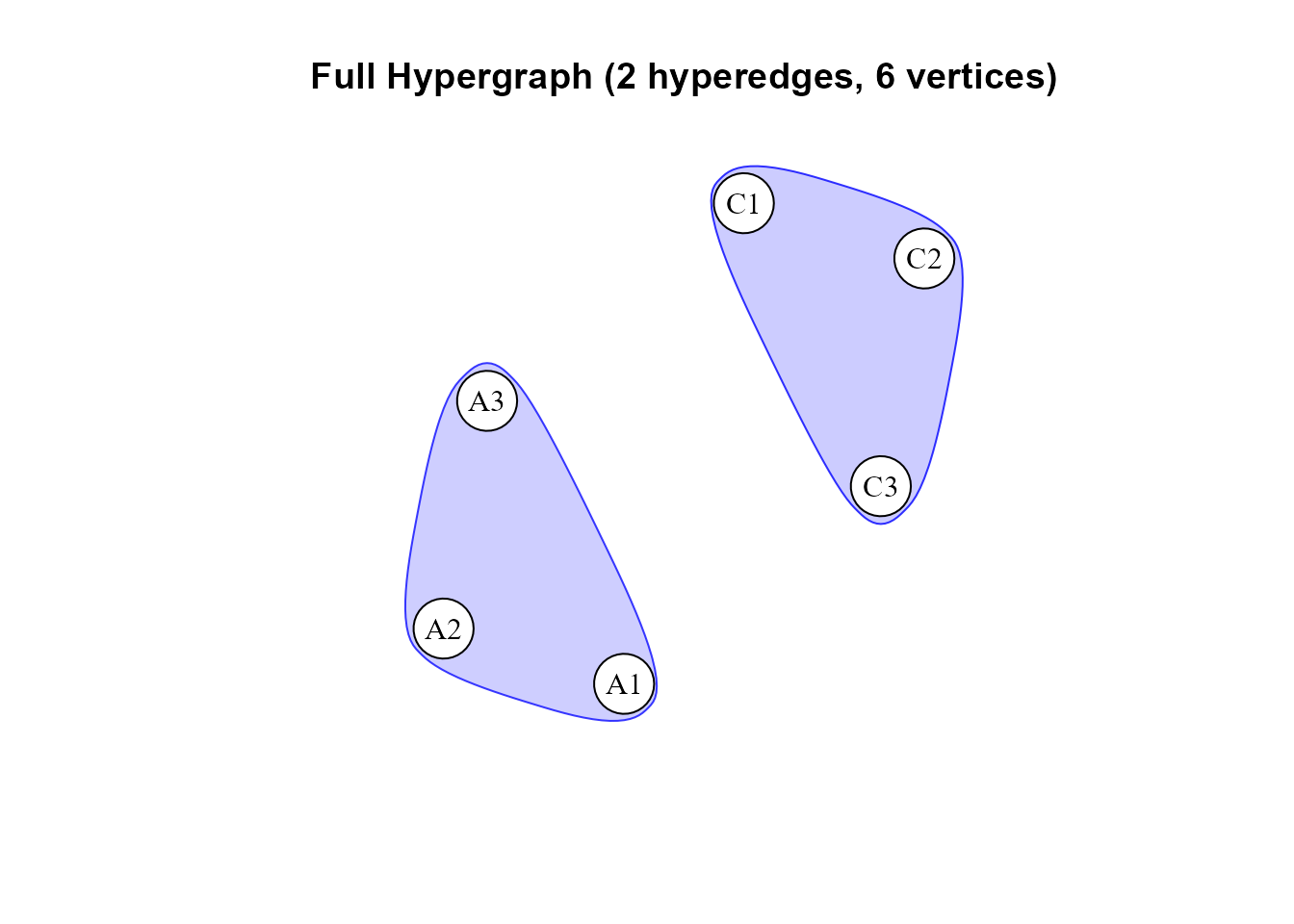
The retained redundant triplets selected from the user-defined fit, without repeating the tests.
node_degree(hg_selected)
#>    node_id node_name  graph_type     degree_type      value
#> 1        1        A1   redundant          degree 1.00000000
#> 2        2        A2   redundant          degree 1.00000000
#> 3        3        A3   redundant          degree 1.00000000
#> 4        4        C1   redundant          degree 1.00000000
#> 5        5        C2   redundant          degree 1.00000000
#> 6        6        C3   redundant          degree 1.00000000
#> 7        1        A1   redundant weighted_degree 0.03329991
#> 8        2        A2   redundant weighted_degree 0.03329991
#> 9        3        A3   redundant weighted_degree 0.03329991
#> 10       4        C1   redundant weighted_degree 0.03487950
#> 11       5        C2   redundant weighted_degree 0.03487950
#> 12       6        C3   redundant weighted_degree 0.03487950
#> 13       1        A1 synergistic          degree 0.00000000
#> 14       2        A2 synergistic          degree 0.00000000
#> 15       3        A3 synergistic          degree 0.00000000
#> 16       4        C1 synergistic          degree 0.00000000
#> 17       5        C2 synergistic          degree 0.00000000
#> 18       6        C3 synergistic          degree 0.00000000
#> 19       1        A1 synergistic weighted_degree 0.00000000
#> 20       2        A2 synergistic weighted_degree 0.00000000
#> 21       3        A3 synergistic weighted_degree 0.00000000
#> 22       4        C1 synergistic weighted_degree 0.00000000
#> 23       5        C2 synergistic weighted_degree 0.00000000
#> 24       6        C3 synergistic weighted_degree 0.00000000
#> 25       1        A1        full          degree 1.00000000
#> 26       2        A2        full          degree 1.00000000
#> 27       3        A3        full          degree 1.00000000
#> 28       4        C1        full          degree 1.00000000
#> 29       5        C2        full          degree 1.00000000
#> 30       6        C3        full          degree 1.00000000
#> 31       1        A1        full weighted_degree 0.03329991
#> 32       2        A2        full weighted_degree 0.03329991
#> 33       3        A3        full weighted_degree 0.03329991
#> 34       4        C1        full weighted_degree 0.03487950
#> 35       5        C2        full weighted_degree 0.03487950
#> 36       6        C3        full weighted_degree 0.03487950
Every node participates in one retained redundant hyperedge in this
small example. Its redundant weighted degree is the absolute weight of
that edge, and its synergistic degree is zero. The calculation follows
the active edge set of hg_selected.
By default, subsetting keeps only statistically retained candidates.
Setting significant_only = FALSE can make an explicitly
exploratory object containing other tested candidates, but does not
change their original significance flags. Such an object must not be
presented as a fully validated hypergraph.
9. Use another node-clustering method
Node clustering can be performed outside the package and supplied to
plot(). The object’s incidence matrix has
hyperedges in rows and nodes in columns. Transpose it
so that each node has a binary hyperedge-participation profile:
H <- t(hg_custom$incidence_matrix)
rownames(H) <- names(data_bfi)

active_nodes <- rowSums(H) > 0
node_clustering <- hclust(dist(H[active_nodes, , drop = FALSE]), method = "ward.D2")

my_groups <- rep(0, ncol(data_bfi))
my_groups[active_nodes] <- cutree(node_clustering, k = 2)

data.frame(item = names(data_bfi), cluster = my_groups)
#>   item cluster
#> 1   A1       1
#> 2   A2       1
#> 3   A3       1
#> 4   C1       2
#> 5   C2       2
#> 6   C3       2
This uses Euclidean distances between binary participation profiles and Ward hierarchical clustering. We exclude isolated nodes from the clustering and keep their group labels at zero. The example has six active nodes; if your own fit has fewer than three active nodes, skip this two-group illustration.
plot(hg_custom, groups = my_groups, vertex.size = 25)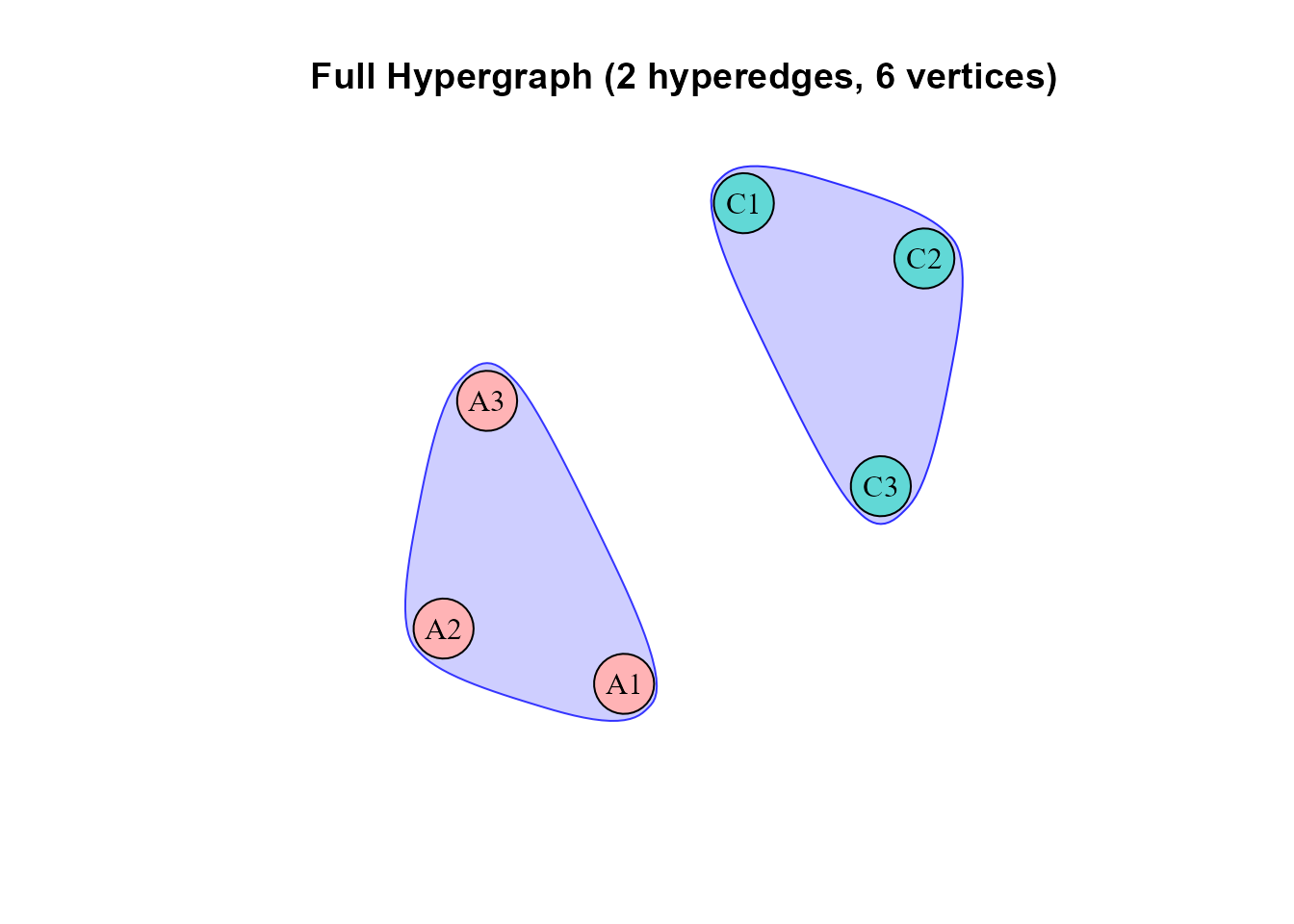
The fitted hyperedges with node colors supplied by an external hierarchical-clustering procedure.
Here the two groups are A1-A3 and
C1-C3. This is straightforward given the two
disconnected retained triplets, so it should not be interpreted as
independent confirmation of a factor model. The grouping changes node
colors; it does not re-estimate or reselect hyperedges.
Three distinct operations have now been separated: candidate generation chooses which variable sets to test; edge subsetting chooses which existing results are active; and node clustering groups variables according to their retained hyperedge structure. They can be customized independently, but answer different questions.
sessionInfo()
#> R version 4.5.2 (2025-10-31 ucrt)
#> Platform: x86_64-w64-mingw32/x64
#> Running under: Windows 11 x64 (build 26200)
#>
#> Matrix products: default
#>   LAPACK version 3.12.1
#>
#> locale:
#> [1] LC_COLLATE=Chinese (Simplified)_China.utf8
#> [2] LC_CTYPE=Chinese (Simplified)_China.utf8
#> [3] LC_MONETARY=Chinese (Simplified)_China.utf8
#> [4] LC_NUMERIC=C
#> [5] LC_TIME=Chinese (Simplified)_China.utf8
#>
#> time zone: Asia/Shanghai
#> tzcode source: internal
#>
#> attached base packages:
#> [1] stats     graphics  grDevices utils     datasets  methods   base
#>
#> other attached packages:
#> [1] future_1.67.0         psych_2.6.1           psychHypergraph_0.2.0
#>
#> loaded via a namespace (and not attached):
#>  [1] tidyselect_1.2.1    dplyr_1.1.4         farver_2.1.2
#>  [4] S7_0.2.0            fastmap_1.2.0       digest_0.6.37
#>  [7] rpart_4.1.24        lifecycle_1.0.5     cluster_2.1.8.1
#> [10] magrittr_2.0.4      compiler_4.5.2      rlang_1.2.0
#> [13] Hmisc_5.2-5         sass_0.4.10         tools_4.5.2
#> [16] igraph_2.2.1        yaml_2.3.10         data.table_1.17.8
#> [19] knitr_1.51          htmlwidgets_1.6.4   mclust_6.1.2
#> [22] mnormt_2.1.1        plyr_1.8.9          RColorBrewer_1.1-3
#> [25] abind_1.4-8         foreign_0.8-90      desc_1.4.3
#> [28] nnet_7.3-20         grid_4.5.2          stats4_4.5.2
#> [31] lavaan_0.6-21       colorspace_2.1-2    ggplot2_4.0.3
#> [34] globals_0.18.0      scales_1.4.0        gtools_3.9.5
#> [37] cli_3.6.5           rmarkdown_2.30      ragg_1.5.0
#> [40] generics_0.1.4      otel_0.2.0          RSpectra_0.16-2
#> [43] rstudioapi_0.18.0   future.apply_1.20.0 reshape2_1.4.4
#> [46] pbapply_1.7-4       cachem_1.1.0        proxy_0.4-27
#> [49] stringr_1.6.0       parallel_4.5.2      base64enc_0.1-3
#> [52] vctrs_0.6.5         boot_1.3-32         Matrix_1.7-4
#> [55] jsonlite_2.0.0      glasso_1.11         Formula_1.2-5
#> [58] htmlTable_2.4.3     listenv_0.10.0      systemfonts_1.3.1
#> [61] jpeg_0.1-11         jquerylib_0.1.4     qgraph_1.9.8
#> [64] glue_1.8.0          parallelly_1.45.1   pkgdown_2.2.0
#> [67] codetools_0.2-20    stringi_1.8.7       gtable_0.3.6
#> [70] quadprog_1.5-8      tibble_3.3.0        pillar_1.11.1
#> [73] htmltools_0.5.8.1   R6_2.6.1            HyperG_1.0.0
#> [76] textshaping_1.0.4   evaluate_1.0.5      pbivnorm_0.6.0
#> [79] lattice_0.22-7      png_0.1-8           backports_1.5.0
#> [82] corpcor_1.6.10      bslib_0.10.0        Rcpp_1.1.0
#> [85] fdrtool_1.2.18      gridExtra_2.3       nlme_3.1-168
#> [88] checkmate_2.3.3     xfun_0.56           fs_2.1.0
#> [91] pkgconfig_2.0.3
This is the environment used to run the analyses and render the vignette. For the methodological background and references, see Getting started with psychHypergraph.